

1. Physical Sorting (The “Layer” Method)
Before you touch a keyboard, sort your items physically into broad categories. This makes the data entry phase much faster because you won’t have to jump between different reference catalogs.
- Primary Sort: Geography (e.g., USA, Europe, Ancient, World).
- Secondary Sort: Type/Denomination (e.g., Pennies, Silver Crowns, Banknotes).
- Tertiary Sort: Chronology (Date order).
Pro Tip: Keep your items in their current binders/trays, but use acid-free “slips” or “flips” with a temporary ID number (e.g., US-001, EURO-050) that correlates to your digital record.
2. The Cataloging Framework
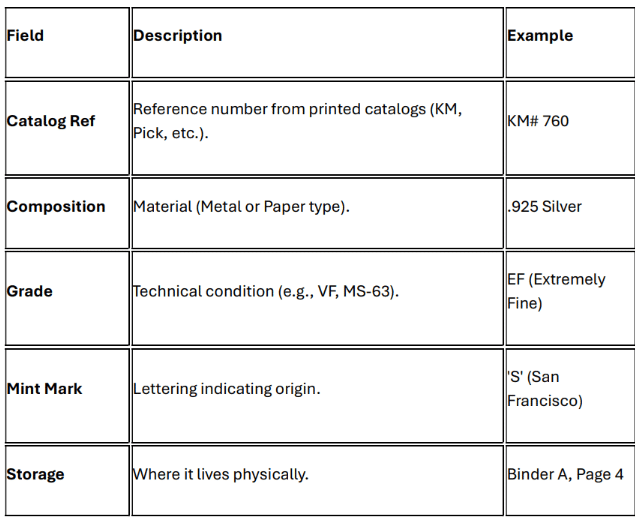
To make your collection searchable on a website, you need a standardized “Schema.”
For every item, record these specific fields in a spreadsheet (Excel or Google Sheets) or a dedicated database:

3. Digitization & Photography
A website is only as good as its visuals. For a collection of hundreds, consistency is vital.
- Lighting: Use two light sources at 45-degree angles to minimize glare on plastic flips and highlight the “relief” of the coin.
- Background: Use a neutral, non-reflective background (black velvet or grey card).
- The “Double Shot”: Always take a photo of the Obverse (front) and Reverse (back). For banknotes, ensure the edges are visible to prove they aren’t trimmed.
- Naming Convention: Name your image files to match your ID number (e.g., COIN-001_Obverse.jpg).
4. Choosing a Digital Platform
Since you want your collection on a website, you have three main paths:
Option A: Collector Communities (Easiest)
Platforms like Numista or Colnect allow you to check your items against their massive existing databases.
- Pros: Instant data; no typing everything; social features.
- Cons: You don’t “own” the website; limited layout customization.
Option B: Dedicated Software (Best for Privacy)
Use software like OpenNumismat (Free/Open Source) or NM Collector.
- Pros: Highly detailed numismatic fields; can easily export to HTML/Web formats.
- Cons: Requires manual setup; looks more like a database than a “slick” website.
Option C: Personal Website (Best for Showcasing)
Use a CMS like WordPress with a “Product Catalog” plugin, or a simple Google Sheets-to-Website tool (like Glide or AppSheet).
- Pros: Total control over the look; great for telling the “story” of specific coins.
- Cons: High time investment.
5. Security Warning
If you are putting your collection online, never include information about your physical home security or the exact location of high-value items. If the website is public, avoid using your real name in the domain or “About” page if your collection is worth a significant amount.